Pharmacy Stock and Billing System in Nepal: A Practical Guide
Learn how a pharmacy stock and billing system in Nepal can manage medicine inventory, batch and expiry, billing, purchases and reports.
 Kritika Ghimire9 min read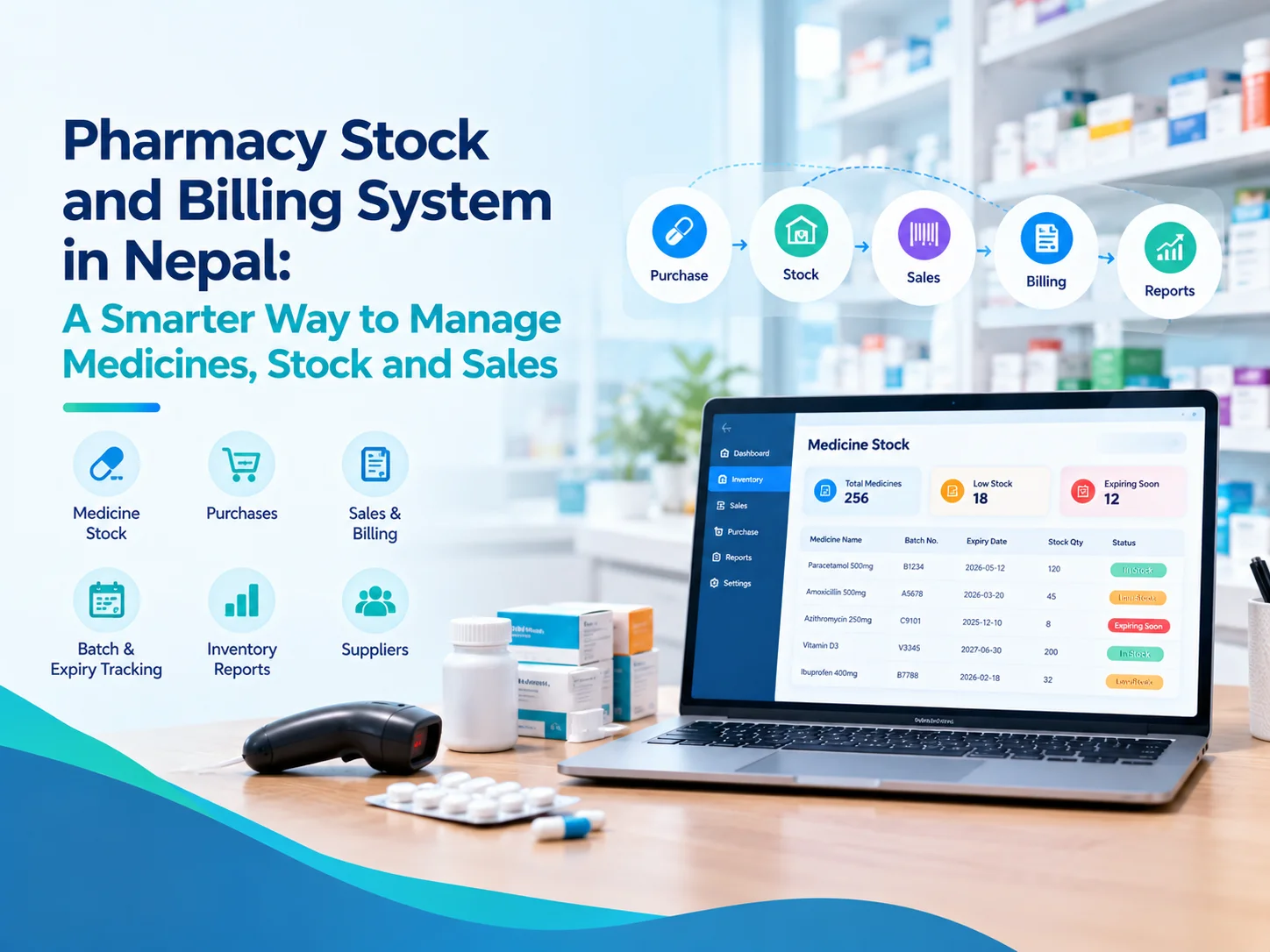
Running a pharmacy isn't about the sale of medicines, it's about more than that. Staff to be aware of what is available, to which batch a medicine belongs, the expiry dates, what was bought, what sold and what needs to be reordered. Paper registers, spreadsheets, and other billing and inventory systems can make it hard to keep accurate record of these activities.
A Pharmacy Stock and Billing System in Nepal can be linked to Medicine Stock to Billing in a single flow. It can even also link medicine sales to services and patient bills for pharmacies that are integrated within clinics, medical centres, or polyclinics.
What Is a Pharmacy Stock and Billing System?
A Pharmacy Stock and Billing System in Nepal is software that can provide assistance to the pharmacies for inventory of medicines, purchases, sales, bills and information on the stock in a single system.
Instead of treating billing and inventory as separate activities, the system can connect:
- Medicine purchases
- Suppliers
- Batch numbers
- Expiry dates
- Stock quantities
- Medicine sales
- Selling rates
- Returns
- Stock-outs
- Payments
- Inventory reports
The system should also reflect how medicines are actually sold. A pharmacy may sell a complete box, a strip, or individual tablets, so the software needs to support these different units.
For businesses comparing pharmacy management software Nepal options, this practical connection between inventory and billing is one of the important areas to evaluate.
Why Pharmacy Stock Management Matters
Medicine inventory is different from ordinary retail inventory because batches, purchase costs, and expiry dates matter.
There may be several batches of a particular medicine, each with a different expiry date and price, in a pharmacy. Not all the staff know which stock should actually be sold out of the total quantity.
That is why it becomes important for Nepal businesses in the pharmacy sector to go beyond the counting of medicines.
A useful inventory system should help answer questions such as:
- How much stock is currently available?
- Which batch does the stock belong to?
- When will that batch expire?
- Which medicines are running low?
- Which medicines are approaching expiry?
- Which supplier provided the stock?
- What has been sold?
- Why was stock removed?
Having these details in one place can make daily stock management more organized. Pharmacy information systems can support activities such as managing prescriptions, dispensing, stock, and billing. The World Health Organization (WHO) also includes pharmacy information systems within its digital health system classifications.
Batch and Expiry Management
One of the most crucial aspects of the inventory management process in a pharmacy is batch and expiry tracking.
A batch and expiry management software solution keeps track of the expiry date for individual batches and not every unit of a medicine.
For instance, ClinicNP maintains stock by batch and expiry, a stock movement principle of ‘oldest expiry first', and prevents selling the medicines that have already expired. It also includes expiry alerts and stock-outs entries with various reasons including expiry, damage, return, loss, internal use, or counted correction.
This provides staff with better information of what stock is actually for sale. This is important for a pharmacy because the expired product cannot be dealt with in the same manner as saleable stock.
Pharmacy Billing Should Connect with Inventory
Billing and inventory should not work as completely separate activities.
Any sale of medicine should be recorded in the inventory. If new stock is bought, the stock available should be increased by the number of purchases recorded on the stock purchase record.
It's here that the pharmacy billing software Nepal businesses use can prove more valuable than the standard receipt printing software program.
ClinicNP is used to support sales of medicine by box, strip and tablet at a rate for each of these. It also accepts cash, QR and credit payments, returns, refunds, cancelled bills and credit settlement.
This could allow for the billing process to mirror the actual manner in which a pharmacy sells medicines rather than packaging all medicines into one unit.
Medicine Inventory and Purchase Management
Stock management starts when medicines are purchased, not when they reach the customer.
The pharmacy should be aware that the product was purchased, from which supplier, batch details, expiry date and the cost paid for the product.
Therefore, good medicine inventory software for Nepal pharmacies should be linked with the purchased medicines and the medicines sold at the pharmacy.
All purchases are logged on ClinicNP against supplier invoices and stock is kept batch by batch with supplier records and running ledgers.
This simplifies the understanding of the source of stock and the flow of stock in the business.
Low Stock and Expiry Monitoring
A pharmacy can lose sales when important medicines are unavailable. At the same time, purchasing too much stock can increase the risk of expiry.
A pharmacy stock management software technology can aid workers track both of these circumstances.
ClinicNP offers at 30, 60 and 90 days low-stock monitoring and expiry warnings. Overselling and expired stock is restricted from sales.
These controls can provide the pharmacy owner with valuable information to assist in determining what should be ordered and what products in the inventory should be attended to.
What Makes Pharmacy Software Useful in Nepal?
Local requirements can make a difference when choosing software.
ClinicNP can be used for Bikram Sambat dates and fiscal years across the system for example. It also facilitates offline billing and registration, enabling the counter to operate even if the internet connection is down, and sync back any transactions when internet is back.
This will be helpful for pharmacies where the billing process can't just cease simply because of a short internet outage.
In this way, companies in Nepal should not be satisfied with going by the number of features available on a website when selecting pharmacy software. The bigger question is, will the system adapt to the actual flow of business in the pharmacy?
Pharmacy POS vs Pharmacy Management Software
A simplePOS system primarily is centered round sales and receipts.
Typically, a complete pharmacy POS software Nepal utilizes can link sales, stock, buys, suppliers, batches, expiry date and reports. The difference is greater, the larger the pharmacy becomes. A basic POS system can report the number of sales made.
A connected pharmacy system can offer an overall perspective of stock movement, purchase, expiry, sales and inventory value.
For pharmacies operating inside clinics or polyclinics, the requirements can be broader because medicine sales may also need to connect with consultation and service billing.
One Billing Workflow for Clinic and Pharmacy
Some healthcare businesses operate a clinic and pharmacy from the same counter. When this is the case, the patient information system, clinic service system and the pharmacy sales system can cause further reconciliation tasks.
ClinicNP is operating one counter and one invoice series in clinic and pharmacy. A consultation, diagnostic service, prescription and medicines can be all part of one billing workflow.
This can make a connected system more appropriate for a clinic with an attached dispensing counter, than a retail billing system.
If your business needs a medicine billing software that can be used along with your pharmacy system, then this type of workflow is worth considering for your Nepal clinics.
Pharmacy Inventory System and Reporting
Useful pharmacy inventory system Nepal businesses adopt should not only record transactions. It should also turn those transactions into information that owners can review.
Useful reports may include:
- Sales activity
- Purchase records
- Stock valuation
- Expiring medicines
- Stock-outs
- Item-level profit
- Supplier activity
- Moving items
ClinicNP provides pharmacy and financial reports including purchase registers, stock valuation, profit by item, expiry and moving-item information, and stock-out registers. Its reports can be filtered using Bikram Sambat date ranges and exported to Excel.
These reports can help pharmacy owners understand not only how much they sold, but also what is happening to their inventory.
User Access and Security
A pharmacy may have several employees working at the counter, but each person may not need access to every function.
For example, a counter employee may need to create bills and process sales, while an owner or accountant may need access to financial reports.
ClinicNP uses four server-enforced roles: Owner, Counter, Accountant, and Doctor. It also maintains a signed activity log for system actions.
Role-based access can therefore help businesses control who can perform particular activities.
What Should You Check Before Choosing Pharmacy Software?
Before selecting a system, pharmacy owners should look beyond the billing screen.
Check whether the software supports:
- Batch-wise stock management
- Expiry tracking
- Low-stock monitoring
- Box, strip, and tablet sales
- Purchase records
- Supplier information
- Returns and refunds
- Stock-out records
- Inventory reports
- User permissions
- Offline operation
- Local date and fiscal-year requirements
If the pharmacy is attached to a clinic, also check whether the system can connect medicine sales with patient visits, services, and clinic billing.
Conclusion
This Pharmacy Stock and Billing System in Nepal should go beyond simply printing receipts. It should keep a Pharmacy properly stocked, provide batch information, expiry date information, purchase information, sales information and movement of the inventory.
Pharmacy inventory and sales management are likely to be the primary needs for a standalone pharmacy. A system that is connected can extend this further, bringing medicines and services together, as well as a single billing workflow to a clinic or polyclinic that has a built-in pharmacy.
Whether it is a small or large pharmacy, the number of users, inventory needs, reporting, and daily workflow all play a role in the decision for which pharmacy software to use.
The key is to find software that is representative of the way the pharmacy functions and offers valuable data for counter workers and owners.
Frequently Asked Questions
What features should pharmacy management software have?
Batch and expiry tracking, low-stock alerts, purchases, supplier details, medicine billing, various units of sale, returns, stock movements, reports, and user permissions are all important features.
Why is batch and expiry tracking important in a pharmacy?
Medicines may be in different batches and/or different expiry dates even though they appear to have the same product name. Pharmacy batch and expiry tracking helps to determine which stock is in the pharmacy, which stock is to be sold first and which stock is no longer to be sold.
Can pharmacy software manage tablet, strip, and box sales?
Yes, pharmacy software can be designed to support various selling units. Indeed, if the software is built around actual pharmacy workflows, then there is no reason it cannot support various selling units.

Written by
Kritika Ghimire
SEO & Digital Marketing Intern
Kritika works on search visibility and the content behind it, and writes about what actually moves a page up the results for a business in Nepal.
More about Kritika