POS Software in Nepal: Features, Benefits and How to Choose the Right System
Learn how POS software in Nepal simplifies billing, inventory, payments, sales reporting and multi-outlet management for growing businesses.
 Kritika Ghimire9 min read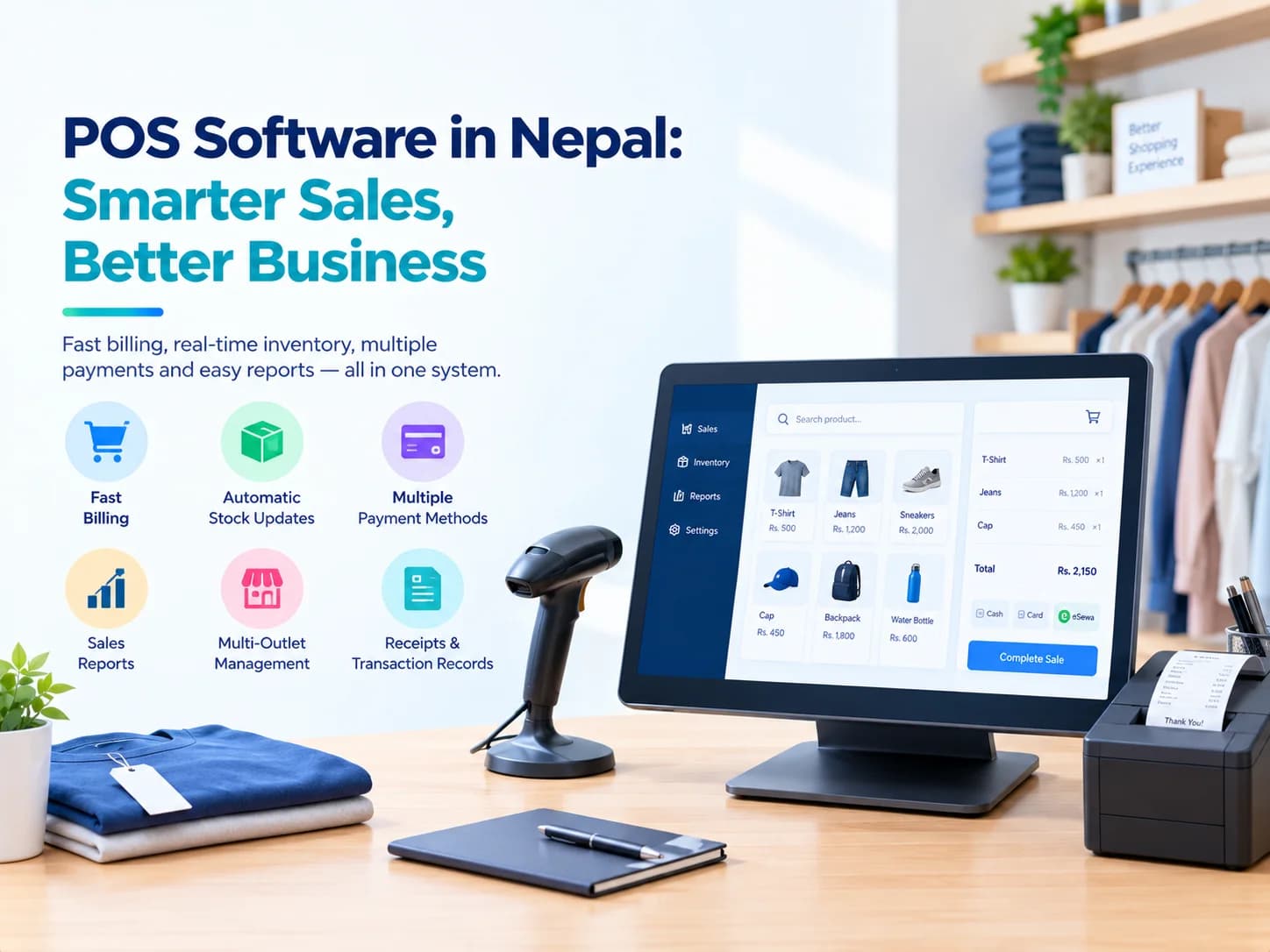
Running a shop, restaurant, café, or retail business involves much more than making sales. Businesses have to also manage their billing, inventory, payments, receipt and sales reports. When each of these functions is managed separately or manually, errors may become inevitable.
This is why businesses in Nepal can benefit greatly from POS software in Nepal. A Point of Sale system integrates sales desk with various aspects of the business, including its stock, payments and sales report. Thus, instead of handling each of these aspects separately, businesses can manage them through one system.
When it comes to growing businesses in Nepal, the right POS system will speed up the billing processes, make stock management more accurate and increase transparency in business operations.
What Is POS Software?
Point of Sale software or POS software is a computerized system to record and handle the transactions made by customers buying a product or a service.
The simple system allows making bills and receipts and a modern Point of Sale software connects sales to inventory, payments and reports.
Thus, for instance, when a product is being sold, it is registered in the system and its amount becomes decreased from available inventory. Therefore, employees do not have to update the inventory manually.
A point of sale software Nepal solution can become a key aspect of daily business operations.
Why Do Businesses in Nepal Need POS Software?
Many businesses still depend on handwritten bills, calculators, spreadsheets, or separate billing and inventory tools. These methods may work when transaction volume is low, but they become harder to manage as a business grows.
Common problems include:
- Slow manual billing
- Incorrect stock records
- Difficulty tracking daily sales
- Errors when calculating discounts and totals
- Difficulty comparing multiple outlets
- Limited sales reporting
- Repeated data entry
With the use of POS software Nepal businesses can organize their billing, inventory, payment and sales reports through a connected system.
For businesses in Nepal, which currently use billing software in Nepal, switching to a POS system will also bring additional visibility into their inventory and sales performance.
Key Features of POS Software in Nepal
Depending on the type and size of the business, there are many features to consider for a POS system. However, the following features prove helpful in case of shops, retail stores, and restaurants.
1. Fast Billing
One should be able to bill customers quickly and effectively with the POS system. The person on the counter is capable of searching products, entering quantities, applying any discount and issuing receipts.
Quick billing can reduce unnecessary delays and help employees manage busy times. A POS billing system that is used in Nepal needs to be simple enough so that an employee is able to perform the work on it without going through complex procedures on the counter.
2. Automatic Inventory Updates
Stocks are directly related to sales. With manual deductions, there are possibilities of errors occurring.
POS software with an inventory feature Nepal allows businesses to deduct stock automatically once a sale is made. This would give a clear idea of the availability of the products.
Retail businesses require such integration of billing and inventory, and businesses that need more advanced stock control can also consider inventory management software in Nepal.
3. Multiple Payment Methods
A customer can pay the price by using cash, cards or digital wallet. Modern POS system can simplify recording the payment methods.
In the case of businesses located in Nepal, supporting cash, card, digital wallet or even mixed payments can simplify the billing process.
4. Sales Reports
Apart from the total revenue generated by the business, the owner might want to have information regarding the sales made during the period.
A POS system can provide reports based on:
- Day
- Product
- Category
- Outlet
- Sales performance
These reports help business owners make decisions based on actual sales data instead of guesswork.
5. Multi-Outlet Management
It becomes difficult to manage multiple branches when each of them keeps a separate record.
A POS system with multi-outlet capability can help businesses to compare and monitor sales in different locations.
This can come handy for retail chains, restaurants, cafes, and growing businesses with multiple outlets.
6. Receipts and Transaction Records
POS systems can generate receipts automatically right after the transaction. Whether businesses use printed or digital receipts will depend on their setup.
It also becomes easy for businesses to access their transaction records from one system.
Retail POS Software for Different Types of Businesses
POS systems are not limited to one business category. Different businesses can use them according to their specific workflows.
Retail Stores
A retail POS software Nepal business can use may help manage products, billing, inventory, discounts, receipts, and sales reports from one system.
This can be useful for clothing stores, electronics shops, grocery stores, supermarkets, and other retail businesses.
Restaurants and Cafés
Restaurants and cafés handle frequent transactions throughout the day. restaurant POS software in Nepal businesses should make billing and payment recording straightforward while providing useful sales information.
A suitable system can help staff process transactions quickly and allow owners to review sales performance.
Small Businesses
A POS software for small business in Nepal companies choose should not create unnecessary complexity. Small businesses may primarily need billing, inventory tracking, payment recording, and basic reporting.
When business expands, more functions can be added.
Multi-Outlet Businesses
Multiple outlets businesses need an effective means of comparing and monitoring sales in different locations.
A connected POS system can help businesses generate outlet-wise report and make it easier for the owners/managers to compare performances of different outlets.
Benefits of Using POS Software
The main benefit of POS software is that it connects everyday sales activity with useful business information.
Faster Checkout
Creating bill faster and minimizing manual calculation can become easier.
Better Inventory Accuracy
Automatic stock deduction reduces the possibility of forgetting to update inventory after a sale.
Improved Sales Reporting
Owners will be able to see sales information by days, products, categories, and outlet-wise.
Fewer Manual Errors
Automated calculations and digital transaction records can reduce common billing and data-entry mistakes.
Better Business Visibility
Instead of depending on individual register or spreadsheets, owners/managers can have all the information regarding their sales through one system.
Easier Business Growth
As a business expands, its POS system can potentially connect with inventory, accounting, or broader business management systems such as ERP software in Nepal.
Cloud POS Software Businesses Can Consider
Additionally, companies can get to know the phrase cloud POS software in their search for various POS solutions.
Cloud systems can allow business data to be accessible via connected devices rather than being stored on one single local computer. In this case, the company can benefit from access from different locations.
Nevertheless, companies should not select their POS system just because it is cloud-based. Instead, they should assess their workflow, internet environment, security, reporting, features required at the counter, and other aspects first.
The main criterion in this case is the reliability of the POS system.
POS Software vs Traditional Billing
While traditional billing concentrates solely on creating invoices/receipts, POS software considers a wider range of actions associated with sales.
So, for instance, the simple billing procedure will include recording the information about sold items while inventory is managed separately.
In the case with POS system, the transaction can be linked with inventory and thus the number of units of sold products can be decreased while the transaction is being documented.
Such integration of billing, inventory, payment transactions, and reporting processes is one of the key reasons why businesses switch to a POS system.
Businesses should also review the latest electronic invoicing and billing information from the Inland Revenue Department when evaluating their billing setup.
How to Choose the Right POS System in Nepal
When you select your POS system, you should start with your actual needs and not with the number of features offered by the software.
Consider Your Business Type
Retail stores, restaurants, cafés, and other businesses may have different workflows. Choose software that fits the way your employees actually work.
Check Billing Speed
The checkout process should be simple and fast enough for busy periods.
Review Inventory Features
If your business manages physical products, make sure sales and inventory can work together.
Check Payment Options
Consider whether the system can record the payment methods your customers commonly use.
Look at Reporting
Choose reports that provide information you can actually use for business decisions.
Consider Future Growth
Your requirements may change as your business grows. Consider whether the POS system can support additional outlets or connect with inventory and accounting systems later.
For businesses looking beyond sales and inventory management, business automation software in Nepal can also help connect broader business workflows and processes
Conclusion
A point of sale (POS) system is not just a digital version of a cash register. In the case of billing, inventory, and payments working together, businesses can minimize manual effort and have a better understanding of their operations.
For retail shop, stores, restaurants, cafés, and multi outlet businesses, using POS software in Nepal can streamline the sales process and make it more efficient and organized.
The right system shouldn't just provide the most features. It needs to be flexible, it needs to be easy for employees to use, it needs to generate reports for you and your business needs and fits into your workflow.
If your business is still using different systems for sales, inventory and reporting, you may be able to make a practical leap toward improved day-to-day operations by integrating a POS system.
Frequently Asked Questions
Is POS software useful for small businesses?
Yes. Small businesses and retail outlets can utilize the point of sale system software to make billing easier, keep a record of the stock, and learn the sales without having to maintain a manual record.
Can POS software support multiple outlets?
Yes. POS software can work with multiple outlets and offer outlet wise sales report as per the system.
Is POS software only for retail stores?
No. POS software is also beneficial to the restaurants, cafés, shops, retail chains and other businesses with frequent transactions with customers.
Can POS software connect with accounting systems?
Certain POS systems have the ability to link with inventory and accounting systems. This can be helpful as a business expands and requires more synchronized operational and financial information.

Written by
Kritika Ghimire
SEO & Digital Marketing Intern
Kritika works on search visibility and the content behind it, and writes about what actually moves a page up the results for a business in Nepal.
More about Kritika