Field Service Management Software in Nepal: A Practical Guide for Businesses
Learn how field service management software in Nepal helps businesses manage service tickets, technicians, schedules, field attendance and customer records.
 Kritika Ghimire9 min readUpdated 29 September 2026
What is field service management software?
The field service management system manages the work carried out beyond the office of a company. The software will assist a firm to be able to receive the service requests, ticket creation, technician assigning, scheduling, attendance recording, job tracking, and maintenance of customer history records.
For many businesses that are expanding their operations, calls, spreadsheets, paper job cards, and chat channels may do. However, challenges start arising with increase in the number of requests. Urgent jobs become buried in chats, duplicated allocation of assignments, lack of technician's service history, among other issues. Field service management software in Nepal brings these activities into one connected workflow. It gives office teams visibility while helping field employees receive clear assignments and update jobs from their phones. The objective is not to monitor every movement. It is to make service work easier to coordinate, verify and improve.
Salesforce describes field service management as organizing and optimizing off-site service activities such as installations, maintenance, repairs and inspections. For a Nepalese business, that means knowing what work is waiting, who owns it, when it is due, what happened on site and what remains unresolved.
Which businesses can use field service management software in Nepal?
Any organization that sends employees or contractors to customer sites can benefit when coordination becomes difficult. Common examples include:
- Internet and telecommunications installation teams
- Solar, electrical and backup-power service companies
- Air-conditioning, refrigeration and appliance repair businesses
- CCTV, security and access-control installers
- Medical and laboratory equipment suppliers
- Water-treatment and pump-maintenance providers
- Facility-management and cleaning companies
- Industrial equipment distributors
- Property inspection and maintenance teams
Field services cannot be considered as field sales. The sales person logs visits, leads, and orders. The service person logs faults, completed work, spare parts, readings, and results. Sometimes, an organization may require both, but the software must distinguish between the two functions.
How Does Field Service Management Software in Nepal Work?
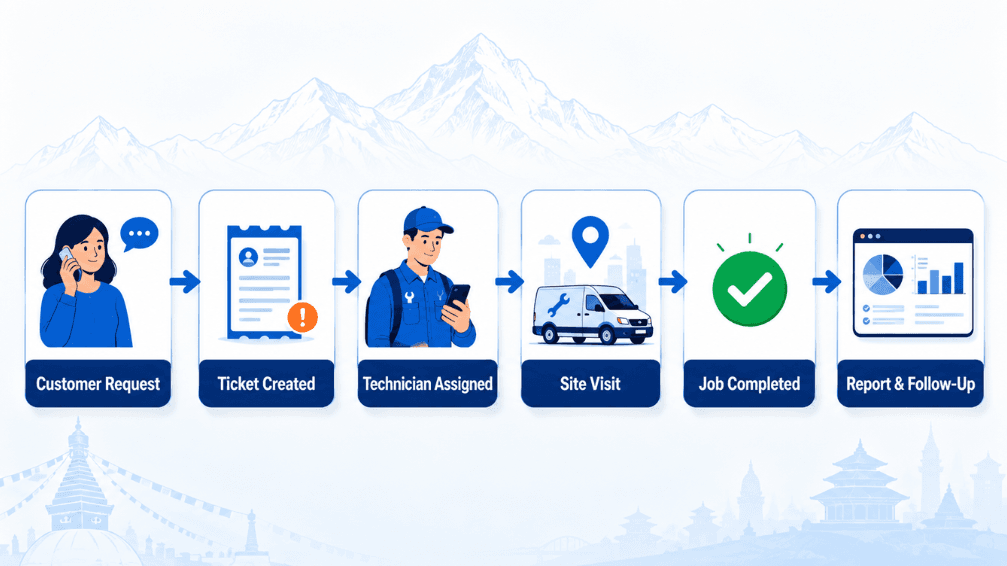
A normal process begins when the client calls, fills out the form or needs a planned maintenance. The request is converted into a service ticket including the client, location, issue, priority, asset and the estimated response.
The coordinator allocates the service ticket depending on availability, skill, location or urgency. The technician gets the allocation on the mobile screen, reviews the history of the client and asset, goes to the place and documents the work. Notes, photos, data, spare parts and client acknowledgment can be saved along with the ticket.
The ticket goes through clear statuses like allocated, ongoing, waiting for parts, solved or completed. Management knows the current queue without having to contact every employee individually. The office staff can provide clients with the correct updates based on the same ticket, whereas reports use the data obtained in the course of the task.
9 important features to look for while choosing field service management software in Nepal
1. Service ticket management
Good service ticket management software gives every request a unique ID, owner, priority and status. Request should link calls, notes, photos and documents to the ticket. This ensures accountability and makes sure the requests are not forgotten. Keep statuses simple and define them. Too many statuses make life difficult for users, while too few keep people from knowing what stops progress.
2. Technician scheduling and dispatch
Effective field service scheduling software helps coordinators assign work according to technician availability, skills, location and urgency. Whenever priorities change, the coordinator and technician see the same changes in their assignment. The smaller team needs only the simple planning tool, while advanced route optimization is helpful only when the amount and complexity of travel justify it.
3. Mobile access
Field employees shall be able to view assignments, contact customers, check service history and report work using an ordinary phone. Forms should be easily manageable on small screens and unreliable connections. It is important to know whether the system allows saving incomplete forms, working offline and synchronization. Form that vanishes due to connection problems ruins everything.
4. Field attendance and visit confirmation
The field attendance app in Nepal can document job-related check-in, check-out, time and place. Use location information responsibly, providing the details on what is collected, when and who can have access to it. Attendance proves the presence but not proper performance of the job.
5. Customer and asset history
A technician works better with previous tickets, installed equipment, serial numbers, warranty information and earlier recommendations. This information becomes critical when the customer owns multiple machines and devices.
6. Digital checklists and evidence
Each job requires its set of information. Serial numbers, photos and commissioning information could be needed during the installation. For preventive maintenance, an inspection checklist is required. During repairs, the information regarding the problem, the cause, the action, the parts and testing could be needed.
Only use those fields that really matter. The long forms lead to quick and useless information.
7. Parts and inventory visibility
When the technician comes to the job without the necessary part, he generates additional visit and wastes the client's time. The integrated system allows keeping track of the available parts, to order parts for the job and keep track of their usage. It would be good to start from expensive and often used items first.
8. Customer notifications
Notifications are used for confirming request receipt, scheduling of visit and providing status update. Don’t send notifications unless they are useful. Over-notifications lead customers and staff members to disregard them.
9. Dashboards and reports
Management needs to have access to unassigned tickets, delayed requests, outstanding parts, repeated visits and technician load. Some metrics that are useful for tracking service process include response time, resolution time, backlog aging and first-time visits. Metrics require context. Number of tickets is not enough to compare simple installations and technical troubleshooting.
Benefits of field service management software In Nepal for Nepalese companies
Fewer missed service requests
There is always an owner and status for every request. No more depending on people remembering the call or email.
Faster coordination
The coordinator sees all the assignments, availability and delayed jobs in one place. Changes in priority get to the right person without having to rebuild the plan from scratch.
Better customer communication
The office staff can review the service information together and give out the information. There are fewer interruptions when the tech gets a call requesting an update.
Better consistent service
Special forms/checklists ensure that everyone performs the job in the same way. Key evidence goes into the customer/asset history.
Less duplicate reporting
Service information entered on-site can be used for job closure, customer history and management reports. Staff does not have to tell the same story over again after work.
Better operational decisions
With accurate data, you know where the problems are and can improve the process rather than making assumptions.
Signs that your business may need a system
Consider field service management software in Nepal when several of these problems occur repeatedly:
- Customers call more than once because nobody can provide status.
- Requests remain in personal phones or messaging groups.
- Managers cannot see the complete backlog.
- Technicians receive assignments without customer or asset history.
- Completed work lacks consistent notes or evidence.
- Attendance records and job records regularly disagree.
- Staff re-enter field information into reports or spreadsheets.
- Repeat visits occur, but their causes are not analyzed.
- Growth creates more coordination work than service capacity.
An occasional mistake may require a clearer procedure rather than new software. Repeated problems across employees and customers indicate a need for a shared operational system.
How to choose the right solution
Test real service scenarios
Ask vendors to walk through a regular installation, emergency repair, parts needed repair, follow-up visit and cancellation. A realistic workflow will reveal more than just a feature set.
Ensure user-friendliness in the field
While managers may choose the software platform, it is the technicians who generate the bulk of its operational data. Make sure to test it on the actual devices and connections your staff uses. Count the number of clicks needed for opening, modifying and closing a ticket.
Review configuration and integration
Make sure the solution supports your vital statuses, roles, forms and reports. Figure out if your customer, inventory, billing or CRM data needs to be integrated with other systems and whose records are they.
Check security, privacy and ownership
Ask about the individual account access, role-based permission model, data backup, audit history, geolocation and data export features. Verify implementation costs, ongoing charges, support options and your data in case you discontinue the service.
Start with a focused first version
Start with ticket intake, ticket ownership, statuses, scheduling, mobile update and closure status proof. Incorporate more advanced inventory, automation and analytics once the initial core process has been utilized by the employees.
Conclusion
The proper field service management software in Nepal transforms scattered calls, messages and work orders into an organized service process. Each and every request is documented, assigned ownership, scheduled, tracked and closed out. Technicians get more context, coordinators can see the current plan and customers get better updates.
The best possible implementation starts with a basic workflow and real-life testing of the field process. The software must cut back on administration rather than add additional report creation tasks.
Serviol by Infobytes Nepal enables service tickets, planning, field activity and daily services process management. If your team currently relies on calls, messaging groups and spreadsheets, contact Infobytes Nepal to request a demonstration using one of your existing service scenarios.
Frequently asked questions
Is field service software the same as GPS tracking?
No. While GPS can assist in dispatch or visit confirmation, field service software manages the entire process including the recording of the problem, assignment, work performed, materials used, evidence, and service record.
Can a small service company use it?
Certainly. The company may start using it with tickets, assignments, mobile notifications, and job completion. It has to avoid spending money on enterprise functionality it does not need at all.
Can it work with poor internet connectivity?
There are systems that provide some offline functions, draft saving, and synchronization after reconnection. Check out the mobile workflow specifically under poor internet conditions.
How much does field service management software cost in Nepal?
The price will depend on the number of users, modules, customization options, integration, hosting, migration, training, and support. It has to be compared with losses from poor coordination, unfulfilled requests, and repeat visits.

Written by
Kritika Ghimire
SEO & Digital Marketing Intern
Kritika works on search visibility and the content behind it, and writes about what actually moves a page up the results for a business in Nepal.
More about Kritika